Almost certainly not, and the true explanation is more unsettling than eavesdropping. People have been hunting for the listening phone for a decade: academic teams, security firms, journalists with packet sniffers. They keep coming back empty-handed, because covert always-on audio would be expensive, visible in your battery and network traffic, and grounds for removal from both app stores. The tent ad arrived anyway. It arrived because the system does not need your words when it already has your behaviour, and your behaviour is a far better predictor of what you will buy than anything you say at dinner.

Has anyone actually tested whether phones listen?
Yes, repeatedly, and the results are boring in the most useful way.
The best-known attempt came from a team at Northeastern University who instrumented more than 17,000 Android apps, ran them automatically, and recorded everything leaving the device. They were specifically looking for audio being captured and transmitted. They did not find it. What they did find was a different leak entirely: a handful of apps recording the screen and sending frames to third-party analytics services, which is arguably worse and got almost no attention because it was not the story people wanted.
Independent security firms have run their own versions, sitting phones next to looping audio of pet food adverts for days and watching for a change in ad content. Nothing.
Three practical arguments back the finding up. Battery and bandwidth would betray it: transcribing speech on-device runs the processor constantly, and uploading raw audio would be an enormous, obvious stream. The indicator would betray it: since iOS 14 an orange dot appears the moment any app opens the microphone, with no way for an app to suppress it. And the policies forbid it: both stores require an explicit permission prompt and a stated purpose, so a company caught doing this secretly loses access to the platform its entire business depends on.
The honest caveat, because a skeptic deserves one: in 2024 a marketing agency really did circulate a pitch deck advertising a product it called active listening, claiming it could target ads from device microphones. The platforms it named distanced themselves and dropped it. It was a sales pitch chasing exactly the fear you are feeling, and no one has produced evidence it ever ran. The desire to sell you microphone targeting is real. The microphone targeting is not.
Why do I remember the ad that matched my conversation?
Because you forget the other four hundred.
You are shown somewhere between three hundred and a thousand ads a day across feeds, videos, search and pages. You register almost none of them. Then one lines up with something you said sixteen hours ago, and it is not just noticed, it is flagged, retold at work, screenshotted, posted. Your memory is keeping a sample of one from a set of hundreds and reporting it as a pattern. Psychologists call the effect the frequency illusion, and advertising is the environment it was practically designed for.
There is a second reason the coincidence feels impossible: you are not counting the near misses. Tents came up at dinner because you were already half-planning a trip. You had probably looked at a campsite, mentioned it in a group chat, lingered on an outdoorsy post. The conversation was not the cause of the ad. The conversation and the ad were both downstream of the same interest, which had already been leaving fingerprints for a week.
What people suspect vs what actually happens
| What it feels like | What is actually happening |
|---|---|
| The app heard the word tent | Your friend searched for tents, and you are in each other’s audiences |
| It read my private messages | Your dwell time on outdoor content already rose two weeks ago |
| It knows what I am thinking | It knows what people with your exact behaviour bought next |
| It reacted within hours | The profile was built over months; only the ad slot was instant |
| It targeted me personally | You were placed in a lookalike segment of a few hundred thousand people |
| Someone is watching me | A model is predicting you, and doing it well |
The row that changes how the whole thing feels is the last one. Nobody is watching. Something is predicting, and it turns out prediction produces the same shiver as surveillance while being much cheaper to run.
So how did the tent ad actually find me?
Through signals you generate constantly without noticing any of them.
Dwell time. How long you stop on a post is recorded, and it is far more honest than a like. You do not decide to slow down on the camping video; you just do, and the system files it.
Pause-on-ad. The half-second you spend before scrolling past a piece of gear is a purchase intent signal, and it is collected whether or not you tap.
The friend graph. Your dinner companion searched for tents that evening. You are connected, you share contacts, you have appeared in the same places. Advertisers can target a person’s connections without ever touching that person’s speech.
Location co-presence. Two devices in the same restaurant for two hours is a strong statement about who you influence and who influences you.
Lookalike audiences. This is the engine. An advertiser uploads a list of recent tent buyers, the platform finds the behavioural fingerprint those people shared before buying, and then serves the ad to everyone who currently matches it. You did not get the ad because you said tent. You got it because your data twin already bought the tent, three weeks ago, in a different city.
Every one of those signals is produced by scrolling. How apps are designed to be addictive explains why the feed is built to keep generating them, and how to reset your algorithm covers what happens when you try to feed it different ones.
“I said the word tent once, at a table, with my phone face down. The ad showed up before I finished my coffee the next morning and I genuinely felt sick. Then I actually looked: my brother had been sending me campsite links for a fortnight and I had opened every one of them. Nothing was listening. I had just told it everything without saying a word.” — Dan, structural engineer, 36
How do I audit my microphone permissions?
Do it anyway. It takes two minutes and it removes a real, if unused, channel.
- Settings, Privacy and Security, Microphone. Every app that has ever asked is listed with a toggle. Turn off anything that has no plausible reason to hear you, which is usually most of them.
- Same screen, Camera and Location Services. For location, prefer While Using rather than Always, and use Approximate wherever the app will still work.
- Settings, Privacy and Security, Tracking. Switch off Allow Apps to Request to Track, which denies every future request in one move.
- App Privacy Report, in the same section. Turn it on, leave it a week, then read it. It logs which apps touched your sensors and which domains they contacted, and it will tell you far more than any guess.
Then notice how little changed. The ads will still be uncomfortably accurate, because the microphone was never the pipe.
If nobody is listening, why does it feel like surveillance?
Because the feeling of being watched and the feeling of being predictable are almost impossible to tell apart from the inside.
That is the part worth sitting with. An ad that guesses right does not prove someone heard you. It proves your behaviour is regular enough to be modelled: the same apps in the same order, the same slowdown on the same kind of post, the same 11pm scroll. The model is not clever. You are consistent, and consistency is all it needs.
Which points at the only fix that actually works. You cannot opt out of prediction with a settings toggle, but you can starve it, because every signal it uses is manufactured by scrolling. Thirty minutes of feed a day produces a thin profile. Three hours produces a rich one. The same mechanism sits underneath why you cannot stop checking your phone and the late-night impulse buying in doom spending: the profile gets better as your sessions get longer, and the ads land hardest when you are tired.
Tape over the microphone if it helps you sleep. Then cut the scroll time, because that is the data diet with actual teeth. Dopamine and social media explains why that is harder than it sounds.
How does Unscrol help?
Start with what you already own. Apple’s Screen Time gives you daily App Limits per app or category, Downtime for scheduled windows, and a genuine weekly average, all free. On the privacy side, App Privacy Report and the Tracking toggle do real work at no cost. If a daily number and a bedtime schedule are enough to cut your sessions down, you do not need to buy anything. Where the built-in tools run out is the per-sitting half: iOS has no native cap on a single session, and App Limits ship with a one-tap dismissal.
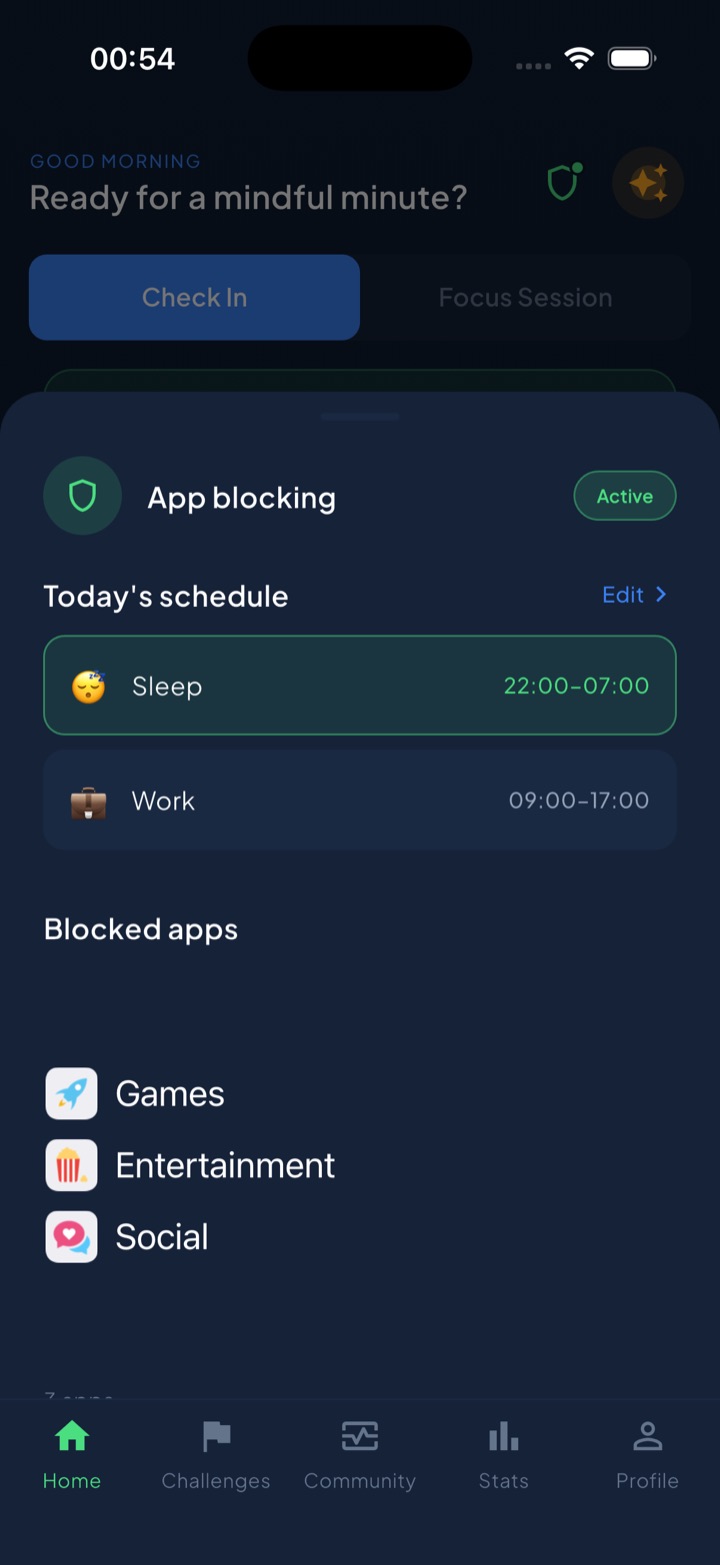
Unscrol is an iPhone and Apple Watch app built around two numbers: a daily total (45 minutes by default) and a per-session maximum (5 minutes by default), both enforced by iOS through the Screen Time and FamilyControls frameworks rather than a cosmetic overlay. Spend a session-sized chunk of the budget and your chosen apps lock for 15 minutes; spend the whole daily budget and they lock until tomorrow. Shield handles blocking by time of day, and switching it off mid-block is deliberately slow, a breathing exercise and a wait rather than a one-tap escape. A streak counts every day you stay under budget, and home-screen and lock-screen widgets show what is left without you opening anything.
The privacy detail matters more than usual in an article like this. iOS hands the app opaque tokens, never app identities: Unscrol cannot see which apps you picked, their names, their icons or your per-app usage. The system draws the picker; the app only draws the frame around it, and block lists and usage data stay on-device. There is nothing for us to sell because there is nothing for us to see. Two caveats, plainly: the usage numbers are threshold-based estimates rather than exact minutes, so treat the budget as approximately right. And it is free to download, with an optional premium tier adding Streak Saver for a missed day and five concurrent challenge slots instead of one. See what an app blocker can and cannot see for the full version.
Frequently asked questions
Is my phone actually listening to my conversations to serve me ads?
Almost certainly not. Security researchers have repeatedly gone looking for it, including a team at Northeastern University that instrumented more than 17,000 Android apps and watched everything they transmitted, and none of them found apps quietly recording audio and shipping it off for ad targeting. The economics also argue against it: streaming or transcribing audio around the clock would show up in battery drain and data usage, and since iOS 14 an orange dot appears in the status bar whenever the microphone is live. Both app stores require an explicit permission and a disclosure for microphone access, so a company doing this secretly would be risking removal from the platforms that carry its entire business.
Then why did I get an ad for something I only said out loud?
Two things are happening at once. The first is the frequency illusion: you see hundreds of ads a day and forget almost all of them, but the one that matches a conversation from last night is unforgettable, so your memory keeps a wildly biased sample. The second is that the targeting is genuinely good without any audio. If you talked about tents with a friend, that friend probably searched for tents, you two share a location history and a social graph, and ad platforms build lookalike audiences out of exactly those signals. The ad did not follow your words. It followed the people and behaviour around your words.
How do I check which apps can use my microphone?
On an iPhone, open Settings, then Privacy and Security, then Microphone, and you will see every app that has ever asked, with a toggle for each. Turn off anything that has no business hearing you, which is usually most of the list. Do the same under Camera, Location Services and Tracking, and while you are in Settings look at Privacy and Security, then App Privacy Report, which logs which apps touched your sensors and which domains they contacted. On Android the equivalent lives under Settings, Privacy, Permission manager. This audit is worth doing, but be clear that it fixes the least important part of the problem.
If turning off the microphone does not stop creepy ads, what does?
Reducing how much behaviour you hand over in the first place. Ad targeting runs on what you do rather than what you say: how long you hover on a post, which ad you scroll past slowly, what you open at 1am, who you sit next to. Every one of those signals is generated by scrolling, so the only real data diet is a smaller amount of scrolling. Fewer sessions, shorter sessions and calmer sessions produce a thinner behavioural profile, and a thinner profile makes worse predictions. Turning off microphone permissions takes two minutes and is still worth doing, but it addresses a channel that was probably never being used.