On an iPhone, a blocking app built on Apple’s Screen Time frameworks cannot see which apps you chose. Not as a matter of policy but of architecture: the picker you tap is drawn by iOS, and what the app receives back is a set of opaque tokens — sealed handles with no name, no bundle identifier and no icon inside them. The app can hand a token back to the system to raise a shield. It cannot open one. It also never receives your per-app usage. This is one of the rare privacy claims you do not have to take on faith, and it is worth understanding before you install anything.

What actually happens when you tap “choose apps” in a blocker?
Almost nothing you would expect.
Every legitimate iPhone blocker is built on three Apple frameworks: FamilyControls for permission and selection, ManagedSettings for the shield, and DeviceActivity for schedules and thresholds. The flow goes like this:
- The app asks for Screen Time authorization. You approve it with Face ID or your passcode — one visible grant.
- The app presents a picker. Crucially, the app does not draw that picker; it is a system view. Your app list is rendered by iOS behind a boundary the third-party app cannot read across — the developer supplies the frame and nothing inside it.
- You make your selection and close the picker. What the app receives is a
FamilyActivitySelection: a bag of tokens.
Step three is where intuition breaks. It feels like you handed an app a list. You did not. You handed iOS a list, and iOS handed the app a set of receipts.
What is an opaque token, in plain language?
Think of a cloakroom ticket. It corresponds to exactly one coat and lets you act on it — hand the ticket back, the coat is retrieved. But the ticket says nothing about the coat: not the colour, not the brand, not who owns it.
An ApplicationToken works the same way. The app can hand it to ManagedSettings and say shield this, hand it to DeviceActivity and say tell me when this crosses fifteen minutes, count how many it holds, and store it to reapply the same shield tomorrow. It cannot turn one into a name, an icon, a bundle ID or a usage figure. Tokens are also scoped: the same app on your phone produces a different token inside a different blocker, so they cannot be used to correlate you between services.
But my blocker shows the app names and icons — how?
This is the objection that convinces most people the privacy claim is marketing, and the answer is elegant. SwiftUI provides a Label view that accepts a token and renders the correct app name and icon on screen, inside a system-controlled view. The pixels appear in the app’s interface; the underlying string never enters the app’s code, cannot be logged, and cannot be sent anywhere.
So you see Instagram and the developer’s code sees an unreadable token pointing at it. Both are true at once. It is the difference between a window and a copy.
What can a blocker actually see, and what can it never see?
| It can see | It can never see |
|---|---|
| That you granted Screen Time authorization | Which apps you selected, by name or bundle ID |
| How many apps, categories and domains you picked | The icon or category of any specific selection |
| That a threshold it registered has been crossed | Exact minutes per app, or a per-app usage history |
| That a shield was applied or removed | What you did inside any app |
| Whatever you type into the app itself — goals, notes, settings | Your browsing history, messages or network traffic |
The right mental model is that the blocker is blind and holding a switch. It knows the switch was thrown and roughly how much time has accumulated against a counter it set. It does not know what is on the other side of the wall.
Why are the numbers in a third-party screen time app only estimates?
This falls out of the same design, and it is the honest counterpart to the privacy benefit. A blocker does not get a live minute counter. It registers thresholds with DeviceActivity — notify me when the selected apps reach five minutes in this interval — and iOS calls back when one is crossed, so usage is inferred from which thresholds have fired. iOS also measures cumulative usage across an interval, not per sitting, so there is no clean concept of this session available to a third-party app at all.
Any iPhone app showing second-level per-app precision is either using Apple’s own on-device report extension, which is sandboxed so tightly it cannot send that data anywhere, or getting the numbers by a route worth asking about. Coarse numbers are a symptom of a good privacy model, not a bug. For what Apple’s own reporting records, see Screen Time’s App and Website Activity.
Why do some apps ask for a VPN profile or a configuration profile?
Because they are doing something FamilyControls cannot do — and this is where the trust calculation genuinely changes.
VPN or content-filter profiles. Website blocking has to intercept a browser request, and Apple’s app shield does not reach into Safari’s traffic. A VPN configuration routes your network activity through a filter that can inspect the domains you visit. Cross-platform tools covering Windows, Android and iOS generally use it, since Apple’s frameworks only exist on Apple’s platforms. It works and it is legitimate, but it is a fundamentally larger surface: whatever runs that filter can potentially see where you go.
Configuration or MDM profiles. These are device-management payloads designed for company- and school-owned hardware. Depending on the payload, a profile can enforce restrictions the user cannot remove and expose a great deal about a device. A consumer app asking a private individual to install one is asking for something never designed for that relationship.
Neither is automatically sinister — a parental-control product, or a blocker that must cover a work laptop, may have no alternative. See parental controls on iPhone and how to block websites on iPhone. But know which bargain you are making: a FamilyControls blocker is structurally incapable of learning much about you, while a VPN-based blocker is asking you to trust it.
One caveat: this is an iOS article. On Android, blockers typically rely on the Accessibility Service and UsageStatsManager, both of which hand over package names and per-app usage in the clear. The opaque-token guarantee is an Apple-platform property and does not transfer.
“I work in a hospital and half of what is on my phone is work. I assumed every focus app was quietly building a profile of me, so I never installed one. What changed my mind was reading how the picker actually works — the app can’t see my selection because iOS never gives it to them. That is a different kind of promise than a privacy policy.” — Nadia, clinical pharmacist, 38
How do you evaluate any screen time app’s privacy claims?
A five-minute checklist for any app in the category:
- What permissions does it ask for? Screen Time authorization alone is a narrow, well-bounded grant. A VPN profile, a configuration profile, accessibility permissions or full network access each widen it considerably. Ask what the extra permission buys you.
- Does blocking require an account? If you must create a login before you can shield a single app, state is going somewhere. That may be fine — sync needs it — but it is a choice, not a necessity.
- How precise are its numbers? On iOS, exact minute-by-minute per-app charts are a signal to look closer, not a feature to reward.
- Read the App Store privacy label, specifically Data Linked to You. Analytics and crash reporting are normal; usage data tied to an identity, or anything under Data Used to Track You, is a different proposition.
- Check the policy on third parties. Advertising SDKs and attribution partners are the realistic route by which behavioural data escapes an otherwise well-built app.
- Ask what happens if the company disappears. An on-device model degrades to the app no longer working. A cloud model means your history lives in somebody’s acquisition.
There is a broader comparison of how the main iPhone blockers differ on this in Opal vs Freedom vs Unscrol and the roundup of iPhone app blockers.
How does Unscrol help?
Honest answer first: the most private screen time tool on your iPhone is the one Apple already ships. Screen Time, App Limits and Downtime involve no third party, cost nothing, and keep everything inside Apple’s own system. If a Downtime window and a passcode a partner holds solve your problem, that is the correct answer and you should stop here.
Unscrol is an iPhone and Apple Watch app for the case where Apple’s limit screen stopped changing anything — built inside the boundary described above rather than around it.
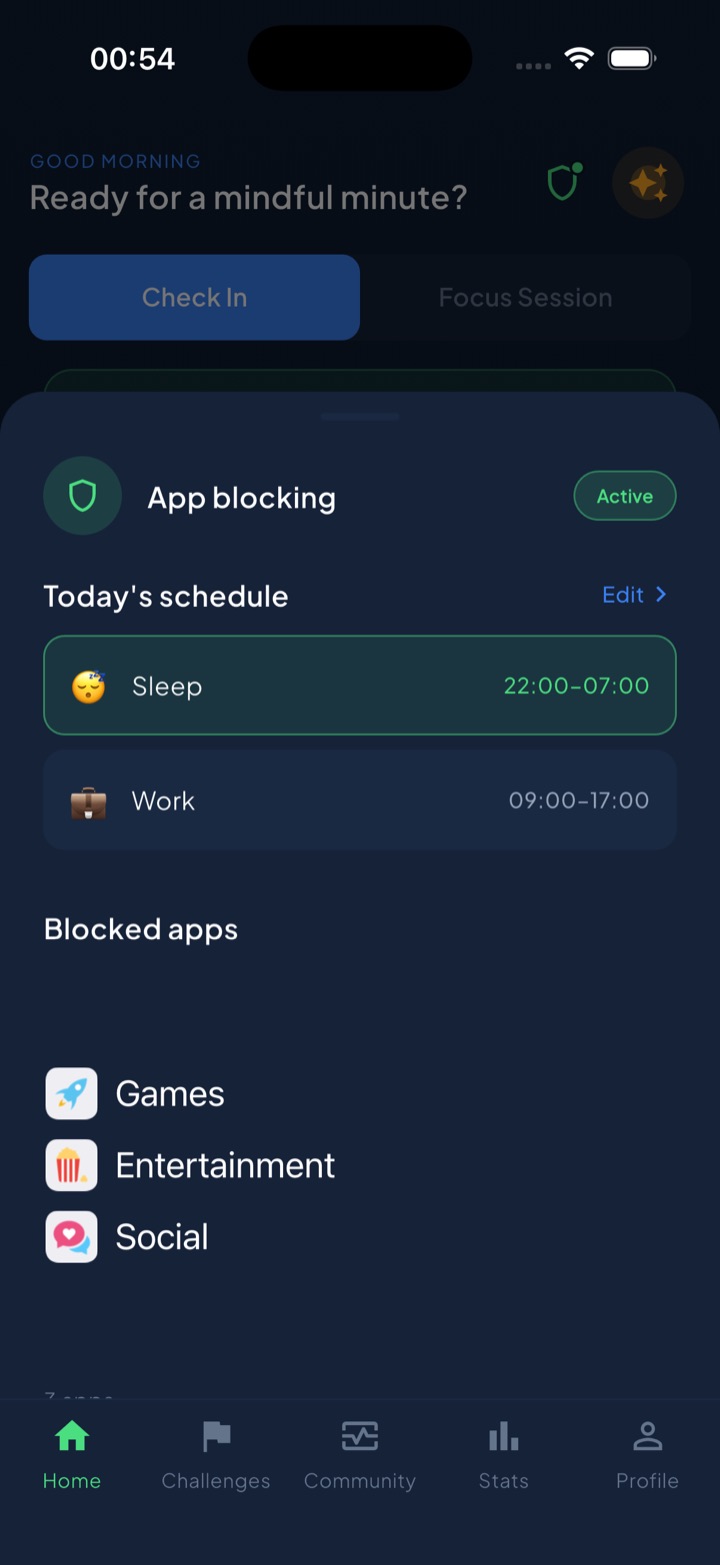
You pick two numbers, a daily total and a per-session maximum, and iOS enforces both: use a session-sized block of the budget and your chosen apps lock for 15 minutes; spend the whole daily budget and they lock until tomorrow. A schedulable Shield covers windows such as sleep or work, and switching it off mid-session is deliberately slow — a breathing exercise and a wait rather than a one-tap dismiss.
On privacy specifically, Unscrol requests Screen Time authorization and nothing else. No VPN. No configuration profile. The picker you see is the system’s, and the app receives only opaque tokens, so it cannot read which apps you chose, their names, their icons or your per-app usage. Block lists and usage data are processed on-device by iOS and never reach Unscrol’s servers. The trade-off is stated plainly in the app: usage figures are estimates derived from crossed thresholds, not a stopwatch, because that is the only number this architecture can produce. Free to download; the optional premium tier adds Streak Saver for a missed day and five concurrent challenge slots instead of one.
Frequently asked questions
Can a screen time app see which apps I blocked?
On iOS, no. A blocker built on Apple's FamilyControls framework never receives app identities. When you pick apps, the picker you are tapping is drawn by the system, not by the app, and what comes back is a set of opaque tokens: sealed handles the app can hand back to iOS to apply a shield, but cannot decode into a name, a bundle identifier or an icon. The app knows how many things you selected and nothing about what they are. This is enforced by the operating system rather than promised in a policy.
What is an opaque token in Apple's Screen Time API?
An opaque token is a meaningless reference that stands in for an app, a website domain or a category you selected. Apple's FamilyControls framework issues them so a third-party app can act on your selection without ever learning what it is. The token can be passed back to iOS to shield the app or to set a usage threshold, and that is all. Tokens are also scoped, so the same app produces different tokens in different apps and cannot be used to correlate you across services.
Why do some app blockers ask you to install a VPN profile?
Usually because they block websites, or block across platforms such as Windows and Android where Apple's Screen Time frameworks do not exist. Routing your traffic through a filter is the only way to intercept a browser request. It is a legitimate technique, but it is a much larger grant of trust than an on-device shield: whatever runs that filter can potentially see the domains you request. The same applies to any consumer app asking you to install a configuration or management profile, which is technology designed for company-owned devices.
How can I tell whether a screen time app is actually private?
Look at what it asks for and what it shows you. An app that only requests Screen Time authorization and never asks for a VPN, a configuration profile or accessibility permissions is structurally limited in what it can learn. Check whether an account is required to use the blocking at all, and read the App Store privacy label for anything listed under Data Linked to You. Be sceptical of precise per-app minute charts on iOS, because that level of detail usually means the data is being handled somewhere the operating system is not protecting it.